
ReorderE Subscriptions App
Customer experience
What customers see at checkout and how they manage subscriptions.
This page summarizes what customers typically see when purchasing and managing subscriptions created with ReorderE Subscription App.
Reference (Shopify Help Center):
Checkout experience
During checkout, customers should see subscription details such as:
- Delivery/billing frequency (for example, every month)
- Any subscription discount applied
- Shipping costs per delivery (where applicable)
Customers must also accept your store’s subscription/cancellation policy text before completing the purchase.
Customer self-service management
Customers generally manage subscriptions through customer accounts, including actions like:
- Viewing subscription details and past orders
- Skipping an upcoming order
- Pausing and resuming
- Canceling
- Updating payment method (through supported gateway/account flows)
- Updating shipping address
Depending on your settings, customers might also be able to change frequency or swap products.
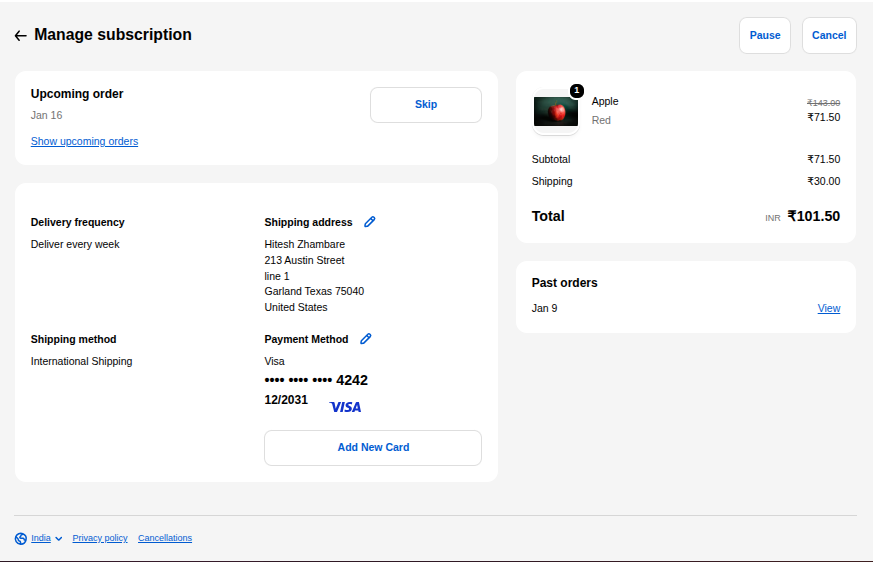
Example: customer portal view with actions like pause, skip, cancel, and payment method updates.
How customers access management
Common entry points:
- Customer accounts navigation (Subscriptions tab/page)
- Links in subscription-related emails
- An order page action button (if enabled)